PicoMix
- embedded
- c
- freertos
When I was in Helsinki to study abroad for a semester I had an IoT Project course in the second period (the semesters are split into two periods in Finland). The programming had to be done on a Raspberry Pi Pico W that came with a hat, which next to some connectors also carried a rotary encoder with a push button and a tiny OLED display. The course ran for about six weeks, from the end of October to the second week of December 2023, and ended with a demo.
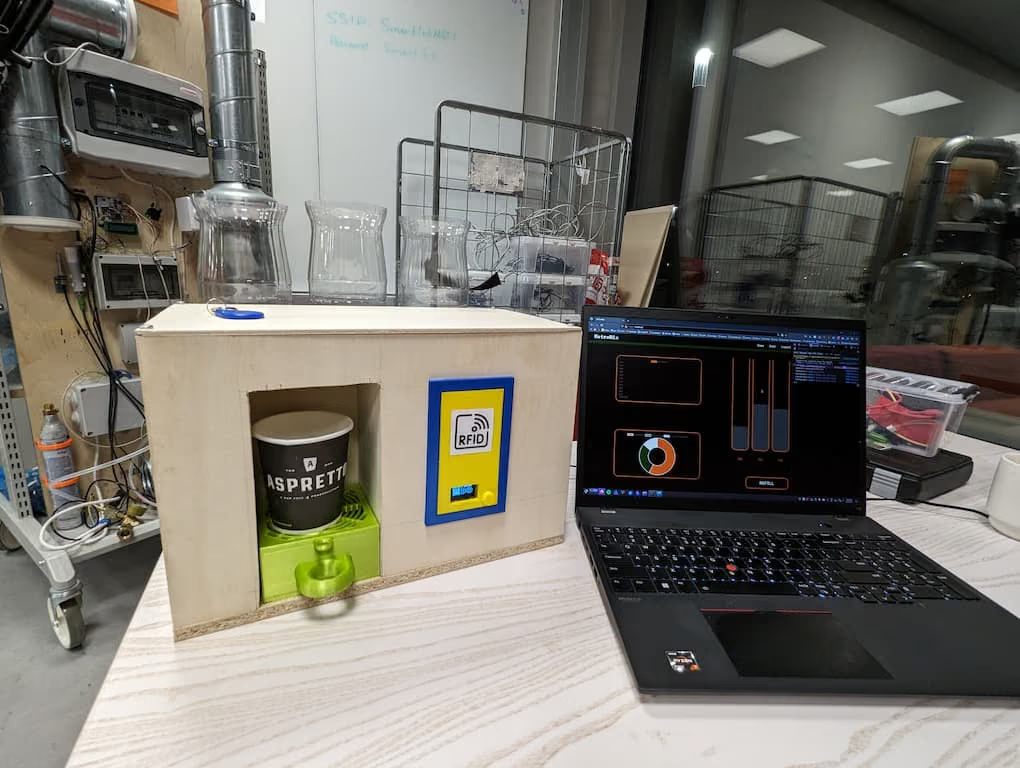
The idea
After some brainstorming with the team we decided that we wanted to build a cocktail mixing machine. It should fill a cup with two liquids and pump them at the same time if possible, and precisely enough that you can set your mix ratio in percent. You first choose one of a selection of drinks, then a size and a ratio, then hold an RFID card to the front and only get the drink if there are credits left on your account.
So a web application was needed as well, to manage your account and to show you how much you have been drinking in charts. For whoever refills the machine it shows how much is left in each bottle and lets them reset the levels after a refill. The backend and the web app were mostly built by the other members of the group, and the firmware was my part.
Parts
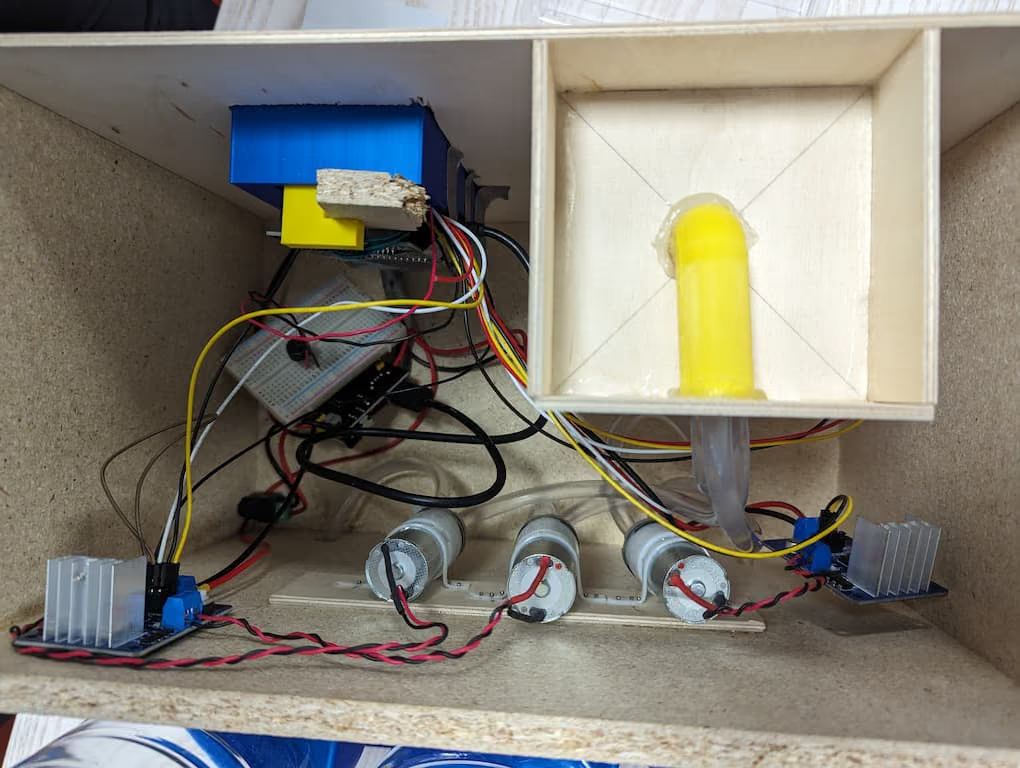
We had access to a wide variety of microelectronic parts and also had a 50€ budget for new ones. Because the goal was a demo we limited ourselves to three kinds of liquid. Also because of some budget problems we did not get pumps or tubing that were rated food safe, so drinking from the machine comes with some health risk, hopefully negligible in comparison to the alcohol that will be consumed.
- Raspberry Pi Pico W
- 128 × 64 OLED display (SSD1306)
- Rotary encoder with push button
- RFID reader (Mifare RC522 kit)
- Time-of-flight distance sensor (VL53L1X)
- Piezo buzzer
- Three 370 DC diaphragm pumps from an Arduino plant watering kit
- A power supply module for the pumps
- Silicone tubing
- Three empty 1.5 litre coke bottles as containers
The case
The case started as a 3D model in Fusion 360. Most of it is plain wooden plates, and while designing it we found that some parts were better 3D printed: the holders for the bottles, a tray to catch spillage, and the two-part front panel that houses the Pico and exposes the display and the encoder. The bottoms of the three coke bottles were sawed off and the bottles put upside down into their sockets. Caps to close them after refilling would have been useful but were not printed before the deadline.
The software
The firmware is C on the Pico SDK with FreeRTOS on top, and lives in metromix-fi/PicoMixController. A lot of things have to happen at the same time (the menu, the Wi-Fi, the card reader, the distance sensor, two pumps, a melody) and FreeRTOS gives you a scheduler with priorities for that without much ceremony. Mastering the FreeRTOS Real Time Kernel is the book I learned it from. I wrote the code in CLion, which has FreeRTOS support, since there is no dedicated IDE for the Pico.
Every part of the machine is its own task: the display task runs the menu as a state machine (drink, size, mixture, authentication, pouring, no cup, done, idle), and the input, RFID, network, time-of-flight, buzzer and pump tasks each wait for work. Tasks talk through FreeRTOS queues, all of which hang off one global struct so any task can reach any other, and where a task only needs to be woken up it gets a task notification instead.
Pouring by the clock
The pumps have no flow sensor, so a pour is a number of milliseconds. A large drink is 100 ms per percent and a small one 70 ms, so a large 50/50 drink runs each pump for five seconds and a large 100/0 drink runs one pump for ten. Each drink is a fixed pair of bottles and the ratio is the split between them.
Running two pumps at once is what the two pump tasks are for. A controller task takes the
pump commands and hands them out to pump task 1 and pump task 2 alternately, so the two
commands for one drink always land on different tasks and run in parallel. The stop signal
turned out to be almost free. A pump task switches its pin on and then blocks on its own
queue with the pour time as the timeout, so it wakes up either because the time is over or
because a stop command arrived, and either way the next line switches the pin off. From
pumps/pumptask.c:
case PUMP_1: {
    gpio_put(PUMP1_PIN, 1);
    xQueueReceive(pumpTaskQueue, &pumpData, pumpData.timeToPour);
    gpio_put(PUMP1_PIN, 0);
    break;
}
The cup
Pouring without a cup makes a mess, so a VL53L1X time-of-flight sensor looks at the spot where the cup should stand. Anything further than 50 mm away is no cup. The display task asks the sensor once before it starts the pumps and then again at each of the ten steps of the progress countdown. If the cup is gone mid-pour it sends a stop to both pump tasks, shows the no-cup screen and keeps measuring once a second for 20 seconds. If the cup comes back within that window the pour resumes with the remaining steps, because the countdown is only reset when a pour starts from the menu. If it does not, the machine gives up with an error.
The knob
The rotary encoder is read from an interrupt. The version that shipped only listens to the rising edge of channel A and reads channel B at that moment to get the direction, which gives one event per detent. A version that watches both edges of both channels is still in the file, commented out.
The push button bounced, so the interrupt handler disables its own interrupt on the first
edge, queues the press, and starts a one-shot 50 ms timer that enables the interrupt again.
The first version used the Pico SDK’s hardware alarm for that timer. Its callback runs in
the hardware timer’s interrupt, and the SDK’s alarm pool does not get along with FreeRTOS’s
interrupt priorities on the Pico, so three weeks later it was swapped for a FreeRTOS software
timer. A leftover define at the top of main.c that tries to disable the alarm pool
entirely is the scar from that.
Getting a drink
Confirming the mixture sends the drink, the size and the two percentages to the network task and shows the card screen. The network task wakes the RFID task up to ten times, one second apart, until a card is read, appends the card’s UID as hex to the request and POSTs the whole thing over TLS to the backend on the lab network. If the request goes through the pour starts, otherwise the error screen. When the countdown reaches zero the buzzer task plays one of three melodies, cycling through them, and the menu goes back to the drink selection.
The machine poured drinks at the demo. Whether the Pico W’s TLS stack would survive a party is a different question, and so is the tubing.